SereneDB Team
May 5, 2026 · 6 minutes read
SereneUI: Evolving Through Feedback
How community shapes our products
SereneUI: Evolving Through Feedback
Since the first release of SereneUI earlier this year, one thing has been consistent: you told us what wasn't working and we fixed it. SereneUI is a database UI that works with both SereneDB and Postgres and because SereneDB is built for Postgres compatibility, the experience should feel equally at home with either. In this blog post we are telling what changed and why.
Improvements
Here are the changes that made the biggest impact, focusing on the areas that received the most consistent feedback:
1. Reworked UI
"Feels pretty good overall, but the contrast is a bit harsh, especially on higher brightness."
"A light theme would really help. It's hard to use during the day."
"Love the app, but I keep adjusting my screen brightness every time I switch back and forth because of the dark UI."
The dark theme worked well in isolation but real workflows don't happen in isolation. Switching between apps, adjusting brightness, working in different lighting throughout the day: the UI had to hold up across all of that.
So we revisited the entire UI, rethinking contrast, balance and adaptability, and introduced a light theme alongside an improved dark one. The result is more comfortable across different lighting conditions, more consistent across contexts and better suited for long sessions.
2. New tab system
"Would be great if I could split the editor and run queries side by side."
"Switching between tabs all the time is a bit annoying. I just want to see multiple results at once."
"Working with one panel feels limiting when you're comparing queries."
One panel is fine until it isn't. When you're comparing results or running queries in parallel, constantly switching tabs breaks the flow more than it helps.
So we introduced a new editor-like tab system, inspired by the way developers work in modern IDEs. Tabs are no longer fixed to a single layout. You can freely move them between panes, split your workspace vertically or horizontally and organize everything the way it fits your workflow. Whether you're comparing results, running multiple queries or exploring different datasets, the interface adapts to you and not the other way around.
3. Unified Sidebar
"Switching between saved queries and entities feels a bit clunky."
"I keep losing context when navigating between sections."
"Would be great to pin frequently used queries somewhere."
"Changing connections is not very convenient, takes too many steps."
Navigation should feel invisible. But when switching between saved queries and entities costs you context and changing a connection takes too many steps, it starts to get in the way.
The sidebar has been completely rethought into a single structured space. Instead of jumping between separate views, everything now lives in one place organized through collapsible sections, making navigation faster and more predictable. We also introduced pinned items so frequently used entities and saved queries are always within reach.
Connection management has been simplified too. Moving it to the header makes the active context always visible, while quick switching via keyboard lets you change connections instantly without breaking your flow.
New Features
While much of our work was driven by feedback, we also continued building towards our core roadmap and introducing new functionality along the way.
Here are the most important additions:
1. Dashboards
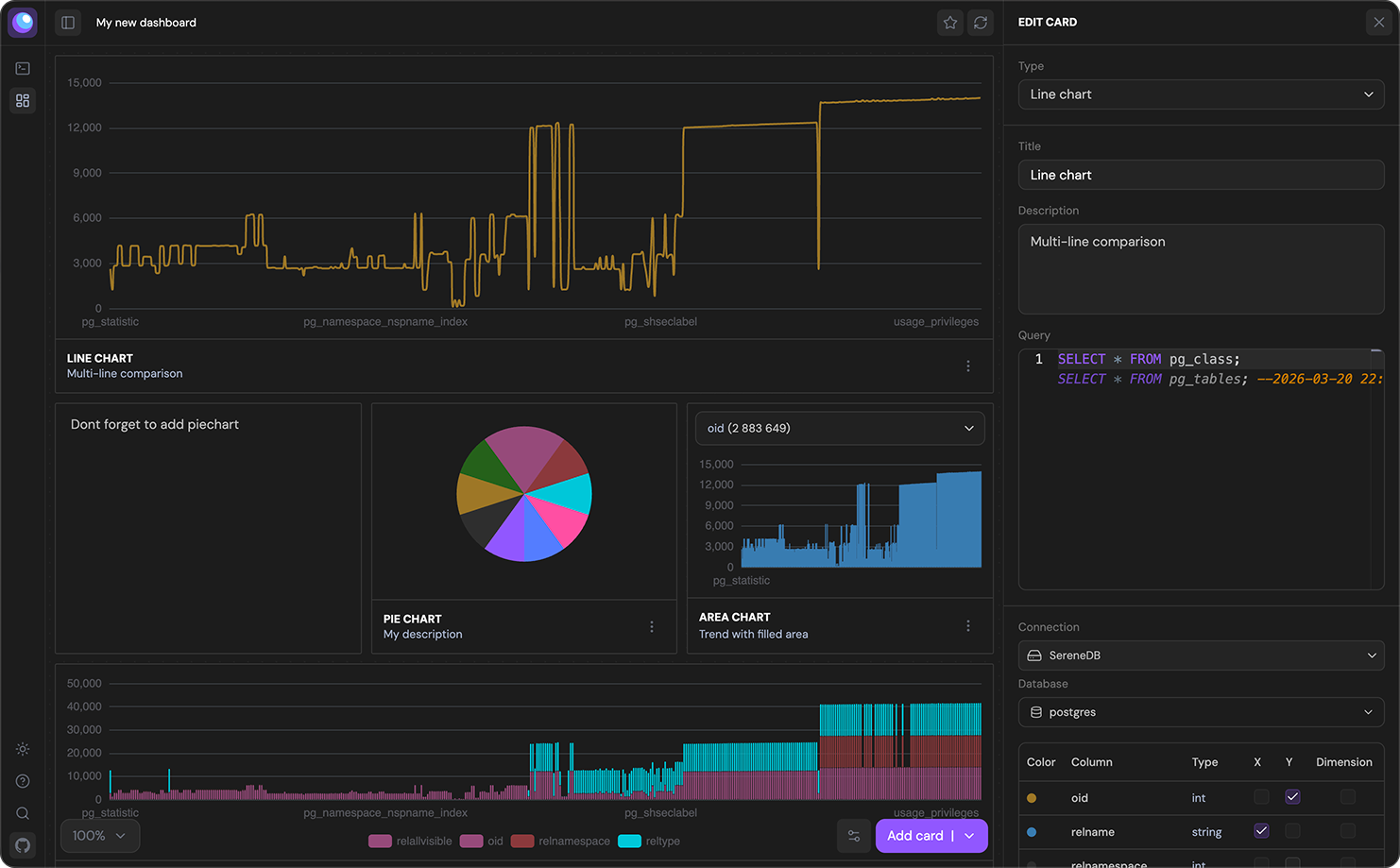
Dashboards started from a simple idea: making it easier to move from querying data to actually understanding it. Instead of exporting results or switching tools, you can now take a query, select the columns you care about, choose a chart template and turn it into a clear structured visualization in seconds.
From there, dashboards grow naturally around your workflow. You can create as many as you need for different use cases, combine data from multiple databases within a single dashboard and keep everything up to date with manual or automatic refresh. What used to be a separate step is now part of the same flow.
2. Sequential execution
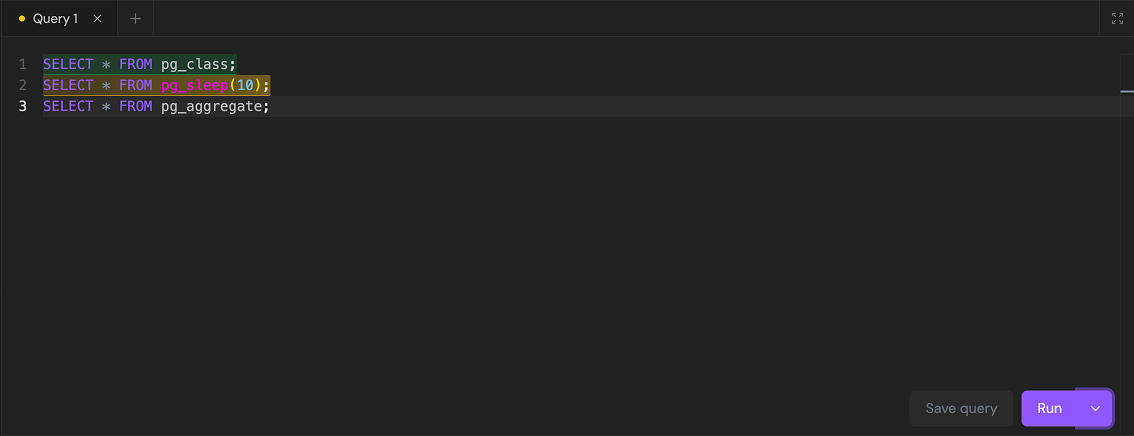
By default, queries in SereneUI run as a transaction ensuring consistency and predictable results. But there are cases where you need more control, especially when working with multiple statements that should execute step by step.
With sequential execution you can now switch to that mode when needed. Simply press run, choose Execute sequentially and watch each statement execute one by one, highlighted directly in the editor as it progresses. All results are collected in a single tab, making it easy to navigate between them without losing context or switching views.
3. Improved Autocompletion
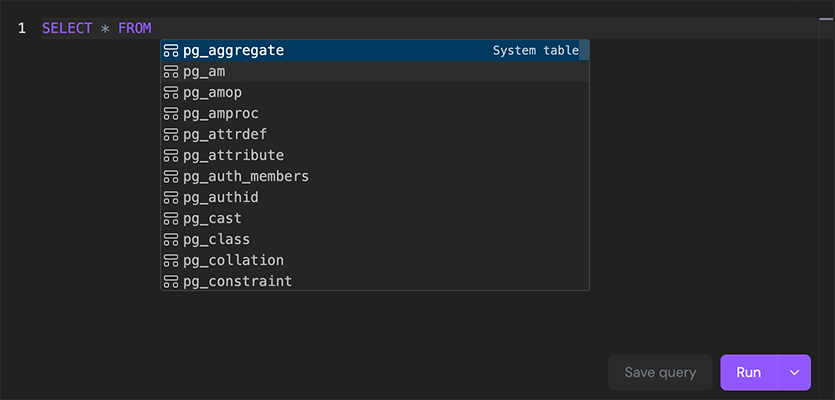
Autocompletion has been reworked to better understand context. Instead of generic suggestions, it now adapts to where you are in the query: suggesting tables when you need tables and columns when you need columns.
We also split autocompletion into two modes: standard and inline. Standard autocomplete helps you build queries in real time, while inline autocomplete surfaces suggestions from your query history and saved queries directly as you type. If you prefer a simpler experience, inline suggestions can be disabled in the settings.
4. Desktop Clients
SereneUI is now available across platforms and no longer limited to running through Docker. We introduced desktop clients for each platform to make installation and usage simpler. Setup is faster and getting started doesn't require any additional configuration.
Here are the downloads:
Built with You
A lot of what you've seen here comes directly from feedback. It helped us spot friction, rethink decisions and focus on what actually matters in everyday use.
We use it as a signal: to prioritize, to adjust and to move faster in the right direction.
Thanks for taking the time to share it. We'll keep listening and improving.
Try it yourself
If you are already running Postgres, SereneUI works with your existing setup with no changes needed. Just point it at your database and see how it feels.
Don’t have a Postgres instance at hand? We put together a quickstart script that runs SereneUI and SereneDB together in Docker. No setup, no strings attached, just a quick way to see what it's like.