
Andrey Abramov
May 7, 2026 · 14 minutes read
A demo trilogy: one SQL, three access modes
Elastic-grade search and analytics over remote Parquet, local files and a native table without changing a query
The previous post made the case for a search engine that indexes data where it lives, with a SQL surface that lets full-text predicates compose with count, avg, GROUP BY and JOIN in one query. This post is the walkthrough.
We built three small demos that share a IMDb reviews on Hugging Face dataset and four queries. Mode 1 indexes the dataset directly from Hugging Face. Mode 2 stages the Parquet locally and points a view at it. Mode 3 ingests the rows into a native SereneDB table. The queries don't change; only the view or table source does.
The point of this article is to show that Elastic-grade ranked search combined with relational analytics over the same dataset works in every mode, expressed as the same SQL. Pick the access mode that fits your operational needs; you don't have to pick a language.
The full demos (DDL, queries, expected output) live in the repo at
For a guided tour of the broader FTS surface (phrase with slop, regex, fuzzy, ngram, multiple scoring models, highlights), see examples/demo3.
Clone the repo and run any of them locally, this article gives you the tour.
The dataset and the four queries
The dataset is the IMDb sentiment corpus, 100k movie reviews split across three Parquet shards (train / test / unsupervised) on Hugging Face. Each row has a text column (the review body) and a label column (-1 for unsupervised, 0 for negative, 1 for positive). 100k reviews is small on purpose, small enough to clone and reproduce on a laptop but big enough that everything that matters in the article shows up clearly.
The same four queries run in every mode. I picked them to cover the things people actually want from search: a pure count, ranked top-K, an analytics aggregate over an FTS-filtered subset and a JOIN with a relational table.
Q1: phrase count
The lightest kind of query you can run. Count matches without ever pulling rows back. Useful for "how many reviews mention X?", faceting and sanity-checking.
SELECT count(*) AS hits FROM imdb_idx
WHERE text @@ ts_phrase('breathtaking cinematography');
Q2: top-K with BM25
The search-engine staple. Phrase, boolean, score boost, ranked top-K. Reads as "find reviews about plot twist (3x boost) OR surprise ending, ranked by BM25, top 5."
SELECT label, BM25(imdb_idx.tableoid) AS score, text
FROM imdb_idx
WHERE text @@ ((ts_phrase('plot twist') ^ 3) || 'surprise ending')
ORDER BY BM25(imdb_idx.tableoid) DESC LIMIT 5;
Q3: hybrid analytics
Now the and analytics part. A count and an average label over an FTS-filtered subset. The full-text predicate is a normal WHERE clause and avg(label::float) is a normal aggregate; both live in one query.
SELECT count(*), avg(label::float) FROM imdb_idx
WHERE text @@ ts_phrase('worst movie ever') AND label >= 0;
Q4: JOIN with a labels lookup
The FTS predicate inside a relational JOIN. Find the reviews matching Q2's compound query, join to a labels lookup, group by sentiment, average BM25 relevance per group. The labels CTE here is a VALUES literal only to keep the example self-contained. In real use you'd be joining to whatever table makes sense (a products table, a users table, an organisations table, anything indexed by the join key).
WITH labels(label, name) AS (
  VALUES (-1, 'unsupervised'), (0, 'negative'), (1, 'positive')
)
SELECT l.name, count(*), round(avg(BM25(imdb_idx.tableoid))::numeric, 2)
FROM imdb_idx JOIN labels l ON imdb_idx.label = l.label
WHERE text @@ ((ts_phrase('plot twist') ^ 3) || 'surprise ending')
GROUP BY l.name;
From here on, the four queries are identical in every mode.
What the surface looks like
Two DDL statements set up everything in every mode. A text search dictionary is the analyzer config (locale, case folding, stemming, normalization):
CREATE TEXT SEARCH DICTIONARY imdb_en (
  template = 'text',
  locale = 'en_US.UTF-8',
  case = 'lower',
  frequency = true,
  position = true,
  norm = true
);
The inverted index sits next to the data like any other secondary index:
CREATE INDEX imdb_idx ON <source> USING inverted(text imdb_en, label);
The @@ operator runs the search inside WHERE. Phrase (ts_phrase('a b')), boolean (|| / && / !!), score boost (^ N), prefix, wildcard, regex and fuzzy are all first-class SQL and they compose with each other and with the rest of the query.
Mode 1: point at a URL, search it
This was the demo I was most excited to build, because it shouldn't quite be possible. The full setup is three statements (demo0/demo.sql):
CREATE TEXT SEARCH DICTIONARY imdb_en (
  template = 'text',
  locale = 'en_US.UTF-8',
  case = 'lower',
  frequency = true,
  position = true,
  norm = true
);

CREATE VIEW imdb_v AS SELECT * FROM read_parquet(
  'hf://datasets/stanfordnlp/imdb@~parquet/plain_text/**/*.parquet');

CREATE INDEX imdb_idx ON imdb_v USING inverted(text imdb_en, label);
That's it. hf:// is Hugging Face's storage scheme; @~parquet is shorthand for the auto-converted parquet branch every HF dataset gets; **/*.parquet expands across the train, test and unsupervised shards. The index lives next to your local SereneDB instance, the data stays on Hugging Face's CDN. No copy of the rows lives anywhere in SereneDB; the index just records where each row is.
All four queries run end-to-end against this view. Q1's phrase count, Q2's BM25-ranked top-K with materialised review text, Q3's count + average over an FTS-filtered subset, Q4's JOIN with the labels lookup grouped by sentiment.
You don't need anything except this. Two DDL statements, one URL, ranked search and SQL analytics over a public dataset. When the server restarts the index is still on disk; only the row content has to be re-fetched from Hugging Face on demand.
This mode is useful when you want to work with data wherever it actually sits. Point at a public dataset on Hugging Face, a Kaggle dump or a bucket on S3 and run real ranked queries. Agents fall naturally into the same pattern. A user-turn might need to search a corpus the agent doesn't own, where no pre-built ingest pipeline can keep up because the next user-turn might want a different corpus. Cross-team data sharing inside a single organisation gets simpler too. One team's bucket becomes searchable from another team's engine, no fan-out copy required.
Mode 2: same SQL, stage Parquet locally
The natural next thing to try is to stage the same Parquet locally and run the same queries against it. The bootstrap is one statement, a server-side COPY that pulls the source from Hugging Face once and writes to local disk (demo1/bootstrap.sql):
COPY (SELECT * FROM read_parquet(
    'hf://datasets/stanfordnlp/imdb@~parquet/plain_text/train/0000.parquet')
) TO '/tmp/imdb_train.parquet' (FORMAT PARQUET);
From there the view points at the local glob instead of the hf:// URL (demo1/demo.sql):
CREATE VIEW imdb_v AS SELECT * FROM read_parquet('/tmp/imdb_*.parquet');
CREATE INDEX imdb_idx ON imdb_v USING inverted(text imdb_en, label);
The dictionary DDL, the index DDL and the four queries are byte-for-byte identical to Mode 1. The only thing that changed is one URL string in the view body. Same SQL, same result rows.
This mode is useful for datasets you want a local copy of, without writing them into a database. The local Parquet is your copy; the index lives alongside it. Training corpora that update by file replacement (model checkpoints, archive dumps, snapshot deliveries) fit cleanly. Re-stage the file when it changes, queries don't. Reference data published as Parquet by an upstream you don't control (regulatory feeds, partner-published catalogs) works the same way. And in air-gapped or low-egress environments where remote URLs aren't an option but the data file is, this is what you reach for. The local copy is one COPY statement; the queries against it are the queries you already have.
Mode 3: ingest once, queries are local from then on
The third mode is the one that looks most like a traditional database. Instead of a view, the data lives in a regular SereneDB table; the inverted index sits next to the rows in SereneDB's native storage. The bootstrap is a one-shot ingest (demo2/bootstrap.sql):
CREATE TABLE imdb (id INTEGER PRIMARY KEY, text TEXT, label INTEGER);

INSERT INTO imdb
  SELECT row_number() OVER ()::INTEGER, text, label::INTEGER
  FROM read_parquet(
    'hf://datasets/stanfordnlp/imdb@~parquet/plain_text/**/*.parquet');

CREATE INDEX imdb_idx ON imdb USING inverted(id, text imdb_en, label);
One network fetch and the data is in your database. The queries themselves (demo2/demo.sql) are byte-for-byte identical to Modes 1 and 2.
There's a reason this mode reads differently from Mode 2. Parquet is a columnar format optimised for full-scan analytics (reading whole columns, aggregating, filtering large ranges). It carries a noticeable overhead for random row lookups, even on a local file, because the format isn't designed for that access pattern. Every materialised row in Modes 1 and 2 pays it. Native storage uses row-oriented point lookups that match per-row materialisation directly, so that overhead goes away.
The bigger thing this mode brings is production behaviour. INSERT, UPDATE and DELETE against the imdb table update the inverted index transactionally, in the same transaction as the row write. Crash recovery uses the WAL the same way it does for any other SereneDB table. Backup, restore and replication all just work, with the FTS index along for the ride like any other secondary index. Search isn't a separate cluster you keep in sync; it's a property of the table.
This mode is useful for production workloads. Live application data with mutations (user-generated content, product catalogs, message threads) flows through INSERT, UPDATE and DELETE on the table. The inverted index updates in the same transaction. Multi-tenant systems benefit from having the FTS index inherit the same backup, restore and replication story as the rows themselves. And anywhere queries need to feel instant (interactive UIs, autocomplete, type-as-you-search, suggested results) belongs here.
What changed across modes
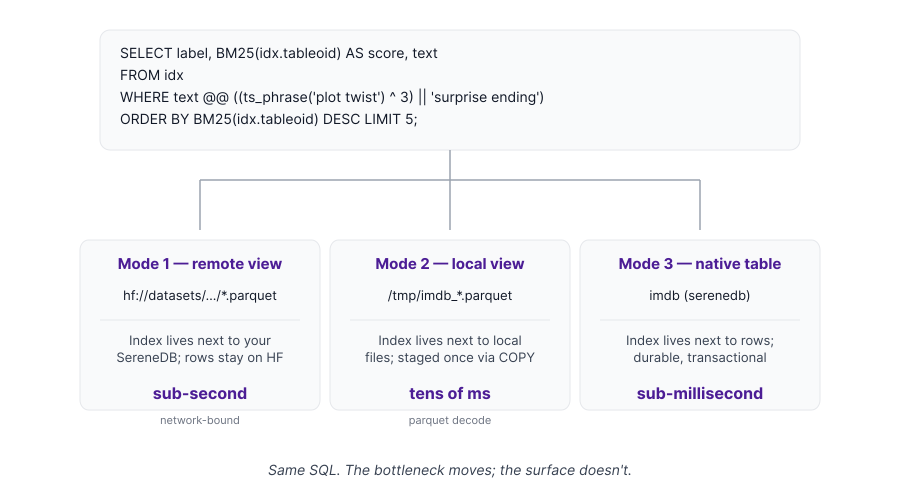
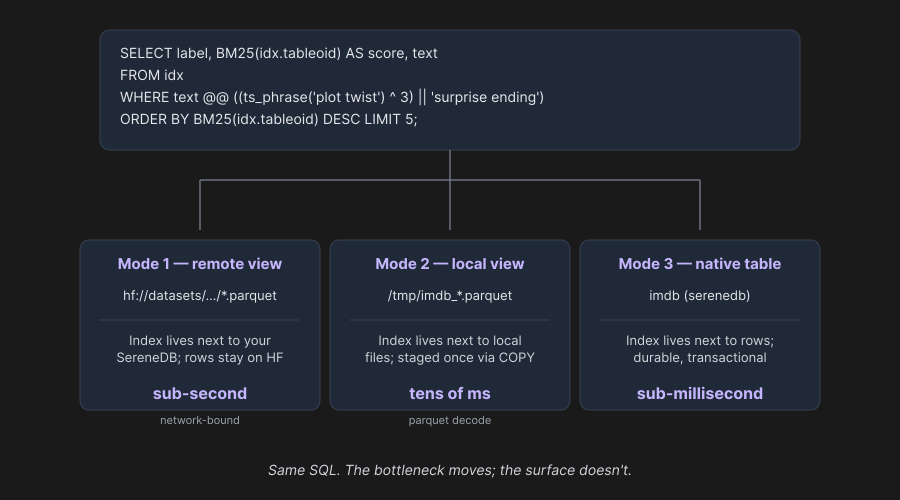
The query surface is identical across all three modes. The diagram above is the proof. What changes is the operational shape around it:
| Mode 1 (remote) | Mode 2 (local) | Mode 3 (native) | |
|---|---|---|---|
| Where the data lives | wherever it sits (hf://, S3, ...) | local file (/tmp/...parquet) | inside the database (imdb table) |
| Data duplicated? | No, index references the source | One local Parquet mirror | Yes, ingested as rows |
| Setup | one view DDL | one COPY + one view DDL | CREATE TABLE + INSERT + index DDL |
| Updates | re-read source on demand | re-stage when source changes | INSERT / UPDATE / DELETE |
| Durability | owned upstream | owned upstream | WAL, transactional |
As you move right, you take on more setup, more control and more responsibility for the data. As you move left, less setup and less ownership; you read whatever the upstream gives you. The query layer stays the same either way. You moved a workload from "look at this remote dataset" to "host it locally" to "ingest into production" by changing one URL or one DDL statement.
Why this matters
The point isn't that one mode is faster than another. The point is that ranked full-text search combined with relational analytics works against data wherever it lives, with the same SQL.
Three concrete things come out of that:
Search on data you don't own. A hf:// URL or a Parquet path on S3 is a complete recipe. No infrastructure, no copy, no schema mapping. A researcher, a data scientist or an agent answering a per-question retrieval can have ranked search over a public dataset in seconds.
Search and analytics in one query. text @@ ts_phrase('...') is a predicate like any other. You compose it with count, avg, GROUP BY, JOIN. Q3 and Q4 in this article are the small version of the pattern, asking things like "how often does this phrase show up, broken down by sentiment" or "what's the average BM25 relevance per group, joined to a metadata table". This is hard to express when search is a separate cluster speaking JSON. It's a normal SQL query when it isn't.
One surface, three operational shapes. A team can prototype against a remote URL, stage a local mirror for read-only workloads and ingest into a native table for production, without rewriting any of the queries that drive the application. That's a property worth having.
Beyond this article
This is one chapter of a longer story. Each of the next pieces gets its own post.
Multi-source queries. Indexes built on different sources can be JOIN-ed or UNION-ed in the same query. A support-ticket search index on a native SereneDB table can be unioned with a product-docs index on remote Parquet and the merged result ranked by BM25 across both. Already supported; deserves a dedicated post given the scope.
Iceberg tables as a first-class FTS source. The same view-backed indexing pattern in this article works against Iceberg as it does against Parquet. Already shipping; showcased separately in an upcoming post.
Vector index with hybrid search. Same CREATE INDEX shape, vector method instead of inverted. The interesting part is composability. Vector similarity, BM25 ranking and a relational WHERE filter all compose in one SQL query. Hybrid retrieval (the inverted index narrows the candidate set with arbitrarily complex FTS conditions such as phrase, boolean, regex, fuzzy and ngram, then the vector index re-ranks within by similarity; or the reverse) is the natural pattern. Demo and post coming.
More analyzers and language packs. English is what we use here; more locales and stemming variants are available. The dictionary template system is open enough to plug in new ones.
The FTS breadth tour. Phrase + slop, regex, fuzzy, ngram, four scoring models (BM25 / TFIDF / LM-Dirichlet / DFI) and highlights. All the parts that didn't fit in this article. The guided tour is already in the repo at examples/demo3; the dedicated post lands soon.
Try it yourself
Everything in this article lives in the examples/ folder of the SereneDB repo on GitHub:
examples/demo0: Mode 1, remotehf://viewexamples/demo1: Mode 2, local Parquet viewexamples/demo2: Mode 3, native SereneDB tableexamples/demo3: the FTS breadth tour (for the follow-up post)
Each demo has a runnable demo.sql, a README with expected output and (for Modes 2 and 3) a bootstrap.sql. To run any of them locally, grab a build from the downloads page. Tarballs, deb and platform binaries are also on the GitHub releases page.
If you find a sharp edge or a feature you wish existed, file an issue. Engineering reads them and prioritises directly.
If you like what you see, star us on GitHub. It genuinely helps us reach more people.