SereneDB Team
Sep 3, 2026 · 17 minutes read
SereneDB meets LangChain: A Vector Store for RAG Pipelines
SereneDB is now available as a VectorStore for LangChain applications
SereneDB has built a VectorStore integration package for LangChain, pairing flexible AI orchestration with the analytical power of a full-featured database. Three wins for your RAG pipeline:
- Unlimited analytical power — native hybrid search, metadata filtering, and relational queries let your agents retrieve on any shape and complexity of data, far beyond simple vector matching.
- Single engine - SereneDB is a full database, not just a vector store. All the surrounding data can stay in the same instance. No additional engines to maintain.
- Rapid development — the package handles all the store specifics, so you can focus on the actual application.
RAG in the modern world
Large language models are remarkable generalists with two well-known blind spots: their knowledge stops at a training cutoff, and they know nothing about your data — internal docs, tickets, codebases, product catalogs. Retrieval-Augmented Generation (RAG) is the pattern that closes both gaps. Instead of hoping the model memorized the answer, a RAG application first retrieves the most relevant pieces of your own data and hands them to the model as context, so the answer is grounded in real, current, private sources — with far fewer hallucinations and even citations to back it up.
In a few short years RAG has gone from a research idea to the default architecture for applied LLM systems: chat-with-your-docs assistants, support bots, enterprise search, code assistants — nearly every "LLM + company data" product is a RAG pipeline at its core. The mechanics have matured along the way. Documents are split into chunks and embedded into vectors, similarity search finds candidates at query time, and modern pipelines layer on hybrid keyword + semantic retrieval, metadata filtering, and re-ranking to keep quality high at scale. Which means every RAG system stands on two practical pillars: a framework to orchestrate the pipeline, and a database that can store and search vectors efficiently.
Today we will talk about one of the most powerful RAG frameworks — LangChain — and how SereneDB slots into it as the vector store.
A little about LangChain
LangChain is an open-source framework for building applications on top of large language models. Instead of wiring raw API calls together by hand, developers compose applications from standard building blocks: a model call, a prompt template, a retriever, a memory layer. The framework's real value is in its abstractions — every provider-specific service (an LLM, an embedding API, a database) is hidden behind a common interface, so an application written against LangChain can swap OpenAI for Anthropic, or one database for another, without rewriting the surrounding Logic.
For making a RAG pipeline with LangChain one usually uses the following blocks: loader → splitter → embeddings → vector store at ingestion time, and query → embeddings → vector store (as retriever) → chat model at answer time. And here is where SereneDB appears.
SereneDB in the pipeline: the vector store
langchain-serenedb plugs
SereneDB into that pipeline as the VectorStore
implementation. So it fits natively into the LangChain pipeline as shown.
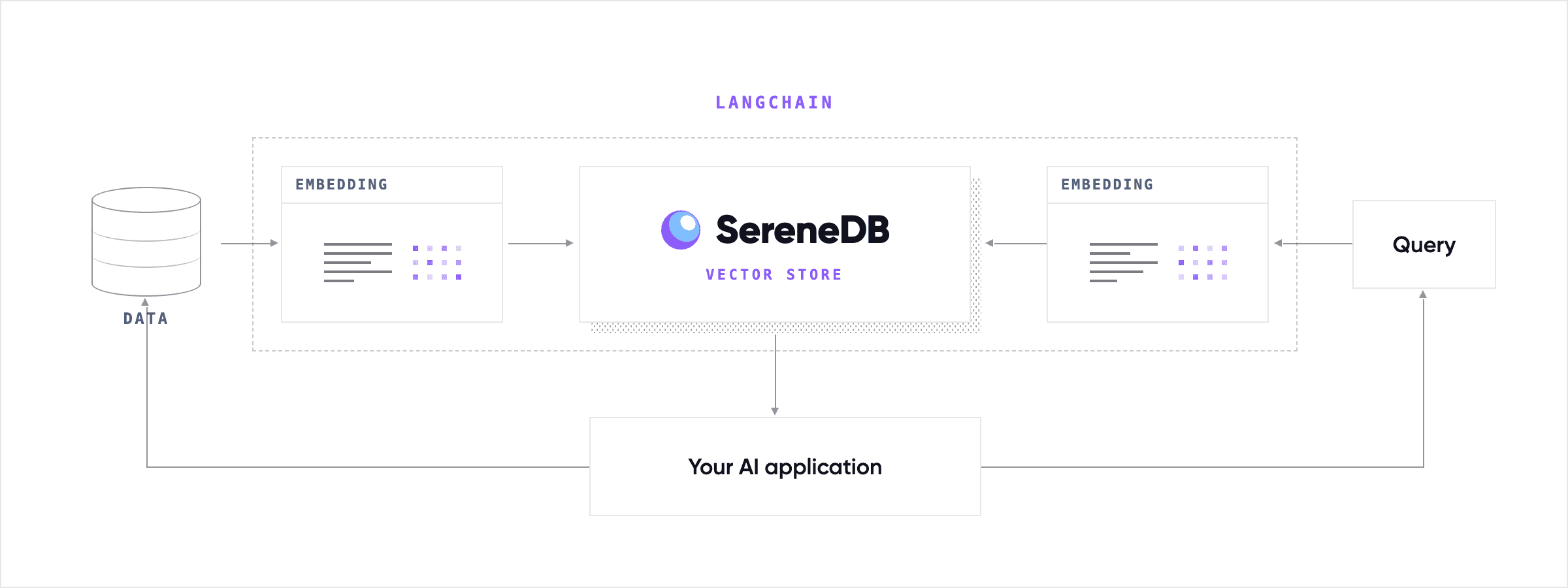
The integration package maps LangChain's vector store contract onto SereneDB's native capabilities: vector columns, distance operators, the IVF ANN index, BM25 full-text search, and JSON metadata.
The key point: You don't need to know SQL. Although SereneDB is a full SQL database underneath, the integration handles the entire database side internally — creating tables, declaring indexes with the right options, composing search queries, and translating filters. You work with Python objects and LangChain's standard vector store API; the package generates correct, index-aware SQL behind the scenes. Someone building a RAG application never needs to learn SereneDB's DDL or SQL query syntax to get full use of its engine — they can stay focused on the real deal: their documents, their retrieval quality, their application.
Let’s see what SereneDB brings to your RAG pipeline.
Vectors first
Vector similarity search is the first thing you need when adding VectorStore to the pipeline. The integration stores your embeddings and queries them through SereneDB's IVF (inverted-file) ANN index for fast approximate nearest-neighbor search at scale. You choose the distance that fits your embeddings — cosine, euclidean, inner product, or manhattan — and the package keeps the index and every query aligned on it. Every standard LangChain entry point — similarity_search, similarity_search_with_score, MMR, as_retriever() — is served by that IVF index, so the whole vector-store surface is index-accelerated, not just a special "fast path."
What about metadata?
Vector search alone gives you the semantically closest chunks, but "closest" isn't always "relevant" — you often want the nearest neighbors among last quarter's tickets, from this author, in the pricing category. In the real world documents carry that structure by metadata — categories, timestamps, authors, tags. And constraining the similarity search by it is what turns a decent result set into the right one. The store gives you a rich filter language rather than bare equality: comparisons and ranges, set membership, existence and text patterns. Every filter compiles to SQL predicates evaluated inside the engine, right beside the vector scan, never as a slow post-filter in Python. Metadata can sit in a zero-ceremony JSON column or be promoted to typed columns when you know the schema — so filters ride an index scan instead of a full table scan.
Content is not just payload
So far the content has been along for the ride — embedded into a vector, filtered by its metadata, then handed back on a hit. But the text itself is a search signal too, and SereneDB can search in it directly. Turn on hybrid search and the store builds a combined index that fuses semantic vector similarity with SereneDB's native BM25 full-text ranking in a single query, so exact terms that embeddings miss — product codes, function names, rare keywords — still surface, combined by the fusion strategy you choose. And because the content column is inverted-indexed, the same machinery lets you bring full-text operators too.
You own your data
SereneDB is self-hostable — and for RAG that is more than an ops preference. The documents you index are usually exactly the data you can't send to a third party: internal knowledge bases, contracts, source code, customer records. Run SereneDB on your own infrastructure and the entire retrieval side of the pipeline — documents, embeddings, queries — stays inside your perimeter. Your data stays yours.
Not just VectorStore
VectorStore is only one corner of the system. SereneDB is a full database rather than a dedicated vector engine, so the same instance that serves your embeddings also serves everything around them: the relational tables your application already needs, analytical queries over your document corpus, full-text search on its own, JSON Storage — one connection string, one operational surface, standard PostgreSQL tooling. Your chunks can live next to the users, sessions, and business data they belong to. While this part is not covered by this LangChain integration package - you can use SQL to access the data and run additional tasks on it. The SereneDB documentation covers the full feature set well beyond what this integration touches.
And what matters the most is that all features are in one engine: IVF-accelerated vector similarity, BM25 full-text ranking fused with it in a single hybrid query, and inverted-index-backed metadata filtering that runs next to the vector search instead of after it. You get the retrieval quality tricks of a modern pipeline — semantic recall, exact-term matching, precise filtering — without stitching together a vector engine, a search engine, and a filter layer from three different products.
Getting started
Now it is time to see SereneDB in action. As a tradition - a small HelloWorld example. You will need at least python 3.10 to run the example.
First of all we get a fresh SereneDB instance running. In this example we will use convenient script that will handle the details of creating a docker container:
curl https://install.serenedb.com | sh
Alternatively you can use other means for creating the instance - look at our QuickStart guide
Now the langchain-serenedb integration package
pip install langchain_serenedb
For the purposes of this example we will use langchain core provided fake embedder. But it is trivial to replace it with any of the embedder integrations supported by LangChain.
from langchain_serenedb import SereneDBEngine, SereneDBVectorStore, IVFIndex
from langchain_core.embeddings import DeterministicFakeEmbedding
from langchain_core.documents import Document

# This is the embedder. Replace it with the real one.
my_embeddings = DeterministicFakeEmbedding(size=768)

# Connect in a postgres style
engine = SereneDBEngine.from_connection_string(
    "host=127.0.0.1 port=7890 user=postgres dbname=postgres"
)

# Create the table and its IVF ANN index in one call.
# All internal SQL is generated automatically.
engine.init_vectorstore_table("my_docs", vector_size=768, vector_index=IVFIndex())

# Spin up the VectorStore
store = SereneDBVectorStore.create_sync(
    engine, embedding_service=my_embeddings, table_name="my_docs"
)

# A tiny corpus to index (page content + optional metadata)
docs = [
    Document(page_content="SereneDB speaks the PostgreSQL wire protocol.", metadata={"topic": "intro"}),
    Document(page_content="The IVF index accelerates nearest-neighbor search.", metadata={"topic": "index"}),
    Document(page_content="Hybrid search fuses BM25 keyword ranking with vectors.", metadata={"topic": "search"}),
    Document(page_content="Metadata filters run inside the engine, next to the vectors.", metadata={"topic": "filter"}),
    Document(page_content="Set sdb_nprobe to trade recall for latency per query.", metadata={"topic": "tuning"}),
]

# Add some document to the index
store.add_documents(docs)

# And run your search!
results = store.similarity_search("how do I configure the index?")
From here it behaves like any LangChain vector store — similarity_search,
similarity_search_with_score, max_marginal_relevance_search, get_by_ids,
delete, and as_retriever() for dropping it into a chain. Of course this is only the basic setup, we will cover more advanced features in the following chapter.
Advanced Topics
Here we provide a short list of most usable features in detail. And dive into some internal machinery that powers our VectoreStore.
Features walkthrough
Accelerated vector search with IVF. SereneDB's ANN index is an IVF (inverted file)
index, and the integration exposes it as a plain Python object: IVFIndex. Declare one
and the package derives the distance metric from your chosen DistanceStrategy
(Euclidean/L2, cosine, inner product) and guarantees the index and every query it issues
agree on it — a consistency detail that trips people up when managing ANN indexes by
hand, handled here automatically. Optional quantization trades a little recall for a
lot of memory and speed: sq8, sq4, pq (with configurable sub-quantizers), or
rabitq (1–9 bits) — each just a constructor argument. For bulk loads, creating the
index after loading lets SereneDB train better IVF clusters; for incremental
workloads, creating it with the table (init_vectorstore_table(..., vector_index=IVFIndex())) means search is accelerated from the first row.
apply_vector_index(), reindex(), and drop_vector_index() manage the index on a
live store — no DDL statements to write or migrations to maintain.
Tunable query-time recall. IVFQueryOptions controls the recall/latency trade-off
per query: nprobe sets how many IVF cluster lists are scanned (applied as the
sdb_nprobe session setting), and rerank_factor sizes the exact-distance rerank pool
when a quantized index is in play.
Hybrid search: BM25 + vectors in one query. Semantic search is great at paraphrase
but can miss exact terms — product codes, function names, rare keywords. Build the
combined full-text + vector index with a HybridIndexConfig, give the store a
HybridSearchConfig, and it runs a single query that fuses SereneDB's native BM25
ranking with vector distance. Three FusionStrategy options are available:
- RRF (Reciprocal Rank Fusion, the default) — combines ranks rather than scores
(
sum(1 / (rrf_k + rank))), so BM25 scores and vector distances fuse without any normalization. - Weighted — min-max normalizes each branch (inverting distance so nearer = higher) and takes a weighted sum, preserving score magnitudes.
- Weighted sum — a plain weighted sum of the raw branch scores. See more detailed description with examples at our documentation page
Metadata filtering. Searches accept a MongoDB-style filter dictionary — $eq,
$ne, $lt/$lte/$gt/$gte, $in/$nin, $between, $exists, $like/$ilike,
composed with $and/$or/$not. On inverted-indexed columns you also get full-text
operators — $startswith, $regex, $fuzzy, $ngram, $match, $phrase — for prefix, regex,
typo-tolerant and phrase matching. The package translates the dictionary into database
predicates for you, so filtering runs inside the engine, right next to the vector
search — no post-filtering in Python, and no query syntax to learn.
Flexible metadata storage — and indexes for it. Metadata can live in a single
JSON column (zero schema ceremony) or be promoted to explicit typed columns via
Column/ColumnDict when you know your schema. Either way it can be indexed for fast
filtering: MetadataColumnIndex for dedicated columns and JsonFieldIndex for
individual fields inside the JSON blob, bundled through MetadataIndexConfig. Indexing
a field inside a JSON document correctly has subtle expression-matching rules at the
database level; the package encodes them so the index is always actually used — another
piece of database expertise you don't have to bring yourself.
MMR retrieval. max_marginal_relevance_search is supported for result
diversification — useful when the top-k nearest neighbors are near-duplicates and the
chain benefits from broader coverage.
Sync and async, one behavior. Every operation exists in both flavors —
add_documents/aadd_documents, similarity_search/asimilarity_search, and so on —
with the sync store delegating to the same async core, so behavior never drifts between
the two.
How it works
Under LangChain's tidy add_documents / similarity_search surface, the package maps a
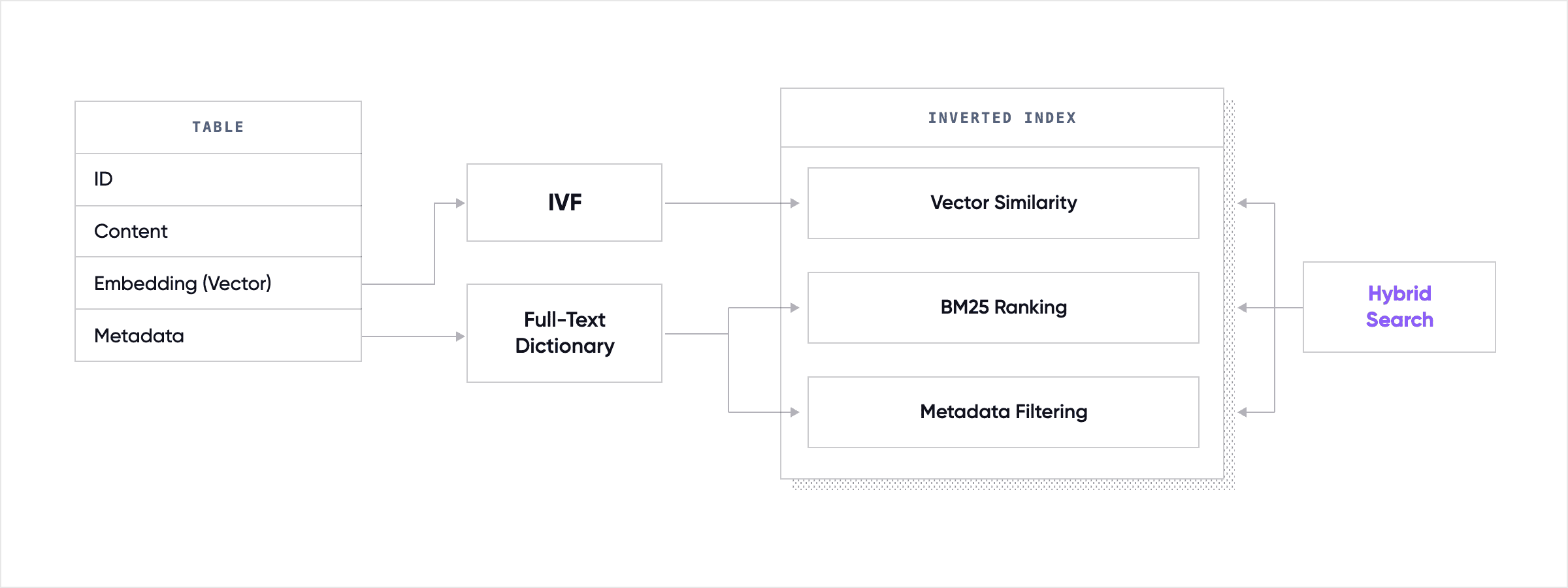
collection onto a deliberately simple SereneDB layout: one table and one inverted
index. Its real job is to keep the DDL it writes and every query it later issues in
lockstep — same distance metric, same extraction expressions, same dictionary — so
searches actually hit the index instead of quietly degrading into a full scan.
The table. init_vectorstore_table creates a single table per collection: an id
primary key, a content TEXT column, the embedding as a fixed-size FLOAT[N]
array, and your metadata. Metadata has
two homes, and you can mix them: a catch-all JSON
column
(the default — no schema to declare) or explicit typed columns promoted with Column
when you know a field's shape and want to index or constrain it.
from langchain_serenedb import Column

engine.init_vectorstore_table(
    "my_docs", vector_size=768,
    metadata_columns=[
        Column("category", "TEXT", nullable=False),
        Column("year", "INTEGER"),
    ],
)
Anything you don't promote still round-trips through the JSON column, so promoting a field is an optimization, never a requirement.
One index, several columns. SereneDB's inverted index is not vector-only: a single
USING inverted (...) can carry the embedding column (with the ivf operator
class for ANN), the content
column (analyzed for BM25),
and any number of metadata columns and JSON
sub-fields — all at once. The package builds exactly one such index per collection and
routes every search through it. That is the whole reason a hybrid, metadata-filtered
query can be one SQL statement: the vector ranking, the keyword ranking, and the filter
predicates are all served by the same index. And it is all powered by our own IResearch library that was started in 2016, and we have never stopped improving it. Check our benchmarks against other search engines in Search Benchmark Game to see the actual performance results.
The full-text dictionary. Full-text scoring needs a text-search
dictionary — the
analyzer that turns raw content into scored tokens. The configuration splits cleanly by
concern: a build-time HybridIndexConfig describes the dictionary (used when the index is
created — the package issues a CREATE TEXT SEARCH DICTIONARY and references it on the
content column), while a query-time HybridSearchConfig carries the fusion knobs (used on
every search). The default dictionary is deliberately universal: a
segmentation template,
lower-cased, with frequency, position, and norm enabled —
each one unlocking a capability, frequencies for BM25
scoring, positions for phrase and
n-gram matching,
norms for the language-model scorers. The dictionary is created in the table's own
schema so an index living outside public can still resolve it — a subtlety the package
handles so you never meet it. Both sides are overridable:
from langchain_serenedb import HybridIndexConfig, HybridSearchConfig, FusionStrategy

# build-time: how the content column is analyzed
index_cfg = HybridIndexConfig(
    dictionary_options="template = 'segmentation', case = 'lower', "
                       "frequency = true, position = true, norm = true",
)
# query-time: how the lexical and vector rankings fuse
search_cfg = HybridSearchConfig(fusion=FusionStrategy.RRF, scorer="BM25")
Deciding what to index. By default the package indexes every declared metadata
column verbatim — one token per value — which is exactly what lets a plain =, IN, or
range filter be answered from the index scan instead of a row-by-row recheck. There is a
safety net: in this index-everything mode a column whose type the inverted index cannot
take verbatim (a NUMERIC, a UUID, an INTERVAL) is quietly skipped, so the automatic
index can never fail to build. When you want control, MetadataIndexConfig states
precisely what joins the index — a subset of columns, a JSON sub-field, or a column
analyzed for full-text.
from langchain_serenedb import (
    MetadataIndexConfig, MetadataColumnIndex, JsonFieldIndex,
)

metadata_index = MetadataIndexConfig(
    columns=[
        MetadataColumnIndex("category"),                                # verbatim → =, IN, range
        MetadataColumnIndex("title", dictionary="langchain_fts_dict"),  # full-text
    ],
    json_fields=[JsonFieldIndex("attrs.brand", "TEXT")],                # a field inside the JSON
)
Here is a schematical data flow inside SereneDB database:
Two choices there carry real database expertise. Attaching a dictionary to a column flips
it from verbatim to full-text-analyzed: you gain the $regex / $phrase /
$fuzzy operators on it but
give up plain-equality pushdown (analyzed columns match through @@,
not =). And indexing a field inside the JSON
blob only works if the index expression
and the query expression are byte-identical — same ->> arrow, same ::type cast on
both sides — or the filter pushes down but returns the wrong rows. The package generates
both sides from one definition so they cannot drift.
Why can't the metric drift? The same principle governs the vector side. An IVF
index
only accelerates a query whose distance operator matches the metric the index was built
with; let them fall out of step and the search silently reverts to a full scan. The
package derives both the index metric and the query operator from a single
DistanceStrategy, so the guarantee holds by construction — the recurring theme of the
whole integration: you declare intent in Python, and the package keeps the generated SQL
self-consistent.
Recap
By bringing vector similarity, BM25 full-text ranking, and metadata filtering together into a single, SQL-backed engine, SereneDB is a good fit for the architecture of modern LangChain RAG pipelines. Instead of managing multiple disparate systems, you get a cohesive retrieval layer that handles complex data shapes with index-accelerated performance. We invite you to try the langchain-serenedb package or dive into our documentation to see how SereneDB can streamline your own AI applications.
Additional links: