
Pavel Ivanov
Aug 11, 2026 · 15 minutes read
Build a search index on someone else's database
SereneDB indexes tables, files and lakehouses. Now it also indexes tables that live inside Postgres and ClickHouse, without moving the rows.
Ask a team where their text lives and you usually get two answers. The data of record sits in ClickHouse or Snowflake or a few terabytes of Parquet on S3. The searchable copy sits in Elasticsearch. Between them runs a pipeline that somebody wrote two years ago, somebody else maintains now and everyone has opinions about.
The duplication is the obvious cost. Every searchable row exists twice and the search copy tends to be the expensive one, because a document store keeps the original JSON alongside the index so it can hand it back to you.
The subtler cost is that the two halves can't talk to each other. Elasticsearch will rank your documents beautifully and then give you a list of ids. If your next question is "and what was the weekly revenue on those?", you write application code to stitch two result sets together. Usually you just don't ask.
SereneDB exists to collapse that arrangement into one engine: Elasticsearch-grade search and ClickHouse-grade analytics, both addressed over the Postgres wire protocol. This release extends it in a direction we've been working toward for a while. You can now build a full-text index over a table that belongs to a different database entirely.
What "search" means here
Lots of analytical databases have bolted on a text index and put "full-text search" on the feature list. You find out how deep it goes the first time a product manager asks for typo tolerance or ranking that goes beyond recency.
Ours comes from IResearch, a C++ information retrieval library our team has been building since 2016. It's what we benchmark against Lucene and Tantivy in Search Benchmark, The Game. SearchBench puts it against Elastic, OpenSearch, ParadeDB and ArangoDB. In SQL you get:
- BM25 ranking with real term frequencies and document norms
- phrase search and sloppy phrase search with a slop window
- fuzzy terms, prefixes and wildcards
- facets and aggregations computed over the matched set
- geospatial predicates on points and geometries
- vector search: IVF with product quantization, RaBitQ, and 4- and 8-bit scalar quantization
- hybrid ranking that fuses text and vector results with RRF
Because one planner sees the whole query, a search predicate and an analytical rollup are the same statement:
SELECT date_trunc('day', ts) AS day,
       count(*)              AS hits,
       avg(rating)           AS avg_rating
FROM reviews_fts
WHERE body @@ ts_phrase('battery life') AND lang = 'en'
GROUP BY day
ORDER BY day;
In the two-system world that's a search request, a JSON response, a list of ids
sent back to your app and a warehouse query with a 40,000-element IN clause.
Assuming the id set is small enough to ship at all.
Where an index can point
Here's the design decision the rest of this post depends on. In SereneDB an inverted index does not belong to one table. It asks a data source for two things: a way to read the rows once at build time and a way to get a given row back later if a query needs its contents. Anything that can answer both can be indexed.
So CREATE INDEX ... USING inverted(...) currently accepts:
| Source | In practice |
|---|---|
| a local table | the ordinary case, with real-time column-wise updates |
| a view | index a projection, a join, a filtered subset, a JSON path |
| Parquet / CSV / NDJSON | on local disk, S3 or Azure Blob, indexed where they sit |
| Iceberg | catalog-managed lakehouse tables |
| a glob | one index spanning a whole prefix in object storage |
| an attached Postgres or ClickHouse table | new and the subject of the rest of this post |
The middle rows are what we've been calling zero-ETL remote search: BM25 and vector search straight over a data lake with no ingestion job in the middle. We wrote that up for source code in code search over a data lake.
A live database behaves differently from a Parquet file. It has its own primary key, its own query planner and its own preferred way of being asked for two thousand rows.
Connecting a database
SereneDB speaks the Postgres wire protocol, so it borrows Postgres's vocabulary
for talking to other databases. Two foreign data wrappers ship today,
postgres_fdw and clickhouse_fdw. Nothing above the connector layer is
specific to either one, so adding an engine takes a connector and nothing else.
Two generic wrappers are in progress right now, ODBC and ADBC. Between them they
reach most of the database market. More on those at the end.
CREATE SERVER events FOREIGN DATA WRAPPER clickhouse_fdw
  OPTIONS (host 'ch.internal', port '9000', database 'prod');

GRANT USAGE ON FOREIGN SERVER events TO analysts;
A CREATE SERVER is catalog DDL. It survives restarts, re-attaches on boot,
shows up in pg_foreign_server and participates in dependency tracking like any
other catalog object. An ATTACH lasts only as long as the session that made it.
Credentials live on the server definition (one shared connection identity, the
way ClickHouse itself does it) and access is a grant.
A foreign server survives a restart. The server definitions and the inverted indexes live in SereneDB; the tables stay in the databases you already run, reachable over each engine's own protocol. Restart SereneDB and the servers re-attach on boot.
For ClickHouse the connector talks the native TCP protocol, columnar blocks and
LZ4, over a pooled and health-checked connection layer, with projection, filter
and ORDER BY / LIMIT pushdown, cardinality from system.tables and automatic
rebinding when the remote schema shifts under it. After that the remote table is
just a table:
SELECT count(*) FROM events.prod.hits;
Indexing it
Everything in this section runs as written. It points at ClickHouse's public playground, so there is nothing to set up on the ClickHouse side at all. Two commands and a paste. The only prerequisite is Docker.
# start SereneDB locally (brings up SereneUI too)
curl -fsSL https://install.serenedb.com | sh

# connect
psql -h localhost -p 7890 -U postgres
The installer prints the exact connect and teardown commands when it finishes,
along with a browser URL for SereneUI — use those if it landed on a different
port. If there is no psql on the machine it ships one too. Then paste this at
the prompt:
CREATE SERVER play FOREIGN DATA WRAPPER clickhouse_fdw
  OPTIONS (host 'play.clickhouse.com', port '9440', database 'default',
           user 'play', secure 'true');

CREATE TEXT SEARCH DICTIONARY en (template = 'segmentation', case = 'lower');

CREATE VIEW hn AS
  SELECT id, title, "by", score, url
  FROM play.default.hackernews
  WHERE type = 'story' AND score > 500
  LIMIT 1024;

CREATE INDEX hn_fts ON hn USING inverted(id, title en)
  INCLUDE ("by");

SELECT title, "by", score
FROM hn_fts
WHERE title @@ ts_phrase('rust')
ORDER BY score DESC
LIMIT 4;
                      title                       |      by       | score
--------------------------------------------------+---------------+-------
 Async-await on stable Rust                       | pietroalbini  |  1102
 I have written a JVM in Rust                     | lukastyrychtr |   718
 Tauri 1.0 – Electron Alternative Powered by Rust | Uninen        |   715
 Rust/WinRT Public Preview                        | steveklabnik  |   628
The index build takes about two tenths of a second, the search about the same.
Three columns end up in three places. title is tokenized into the index, "by"
is included so it comes off local disk and score is neither — it is fetched
back from ClickHouse by id, but only for the four rows that survived the
LIMIT. ClickHouse has no idea any of this happened.
The LIMIT 1024 is there because this runs on somebody else's server. The
playground is public and rate-limited, so the example takes a small slice and
stays well inside the quota — enough to watch the thing work and no setup on
your side at all. Point it at your own ClickHouse the moment you want more than
a look. The slice is arbitrary, so your four titles will not be these four.
One more, because it costs people an afternoon: the dictionary above sets
case = 'lower'. The default is none, which indexes terms exactly as written
and then ts_phrase('rust') matches nothing at all while ts_phrase('Rust')
matches everything.
How much of your data the index keeps
This is the knob people usually don't know they have.
By default the index holds postings, positions, norms and document lengths, plus
whatever key it needs to find a row again. Your actual column values aren't in
there. Ask for them and SereneDB goes and reads them from the source. INCLUDE
changes that per column: named columns get written into the index's own
columnstore and reading them afterwards costs one local read and no trip to the
source at all.
Included columns stay local. id and the BM25 score come out of the index
itself, author and posted_at out of the index's columnstore because they were
included. Only text is fetched from ClickHouse, by primary key, for the ten
rows that survived the LIMIT.
So you get a dial.
Store nothing. Smallest possible index. Good when the source is fast and
local or when most queries only need counts, scores and ids anyway. A surprising
number of "search" workloads are really count(*) with a WHERE clause and
those never touch the source at all.
Store what you display. The common setting. Include the title, the url, the price, the timestamp: whatever a result card renders. Searches serve entirely from the index; a user who clicks through to a full record pays one keyed read.
Store everything. Now the index is a self-contained local mirror and the
source is only consulted when you rebuild. This is roughly what Elasticsearch
does with _source, except Elasticsearch decided it for you, which is part of
why the mirror costs what it does.
Concretely. A shop's product table holds title, description and brand,
which arrive with a supplier catalogue and change a few times a year, next to
price_cents and stock, which change all day and change inside transactions,
because you cannot sell stock you do not have. Index the text, include the brand
and leave the two numbers where the transactions are:
CREATE INDEX products_fts ON products
  USING inverted(sku, title en, description en)
  INCLUDE (brand);
Search then runs entirely on local disk, matching and ranking and filtering by brand, while the two values a customer actually acts on are read from Postgres as the page renders. The price on the screen cannot be stale, because we do not have it. When the index falls behind, a product from yesterday's catalogue import is not findable yet. Nobody is ever shown a wrong price.
The reason to include a column is that you do not want the round trip. Everything you leave out is read from the source when a query asks for it, so put the columns your result page renders into the index and the search stays on local disk.
There is also a limit worth knowing about. The connector can only go back to a
view that reads one source plainly. Put a join or a GROUP BY in the view body,
say SELECT customer_id, string_agg(body, ' ') FROM tickets GROUP BY customer_id
and reading real columns is refused outright with
materialising real columns from this view-backed inverted index is not yet supported.
That index still matches, counts and ranks. It just cannot hand you the rows.
What that buys you
No second copy of the corpus. You store an index and you choose per column how much more than that you want.
No pipeline. There's no CDC job, no queue, no mapping template drifting out of sync with a schema, no dashboard panel asking whether the sync is behind. The build is a DDL statement.
Adoption without a migration. This is the part platform teams actually care
about. Your warehouse stays where it is, keeps its ingest, its retention rules
and its access control while gaining a capability from the outside. If it
doesn't work out, DROP SERVER puts you back exactly where you started. That's
a much easier conversation than "we should move the data."
Results that are relations. The matched set is a table like any other, so you can aggregate it, window it, join it to a local dimension table, park it in a CTE or rank it by a blend of BM25 and vector distance. Over rows that are physically in ClickHouse.
Keep the database you have. Add search on top of it. Skip the copy in between.
How the lookup works
Four things happen between CREATE INDEX and a row coming back.
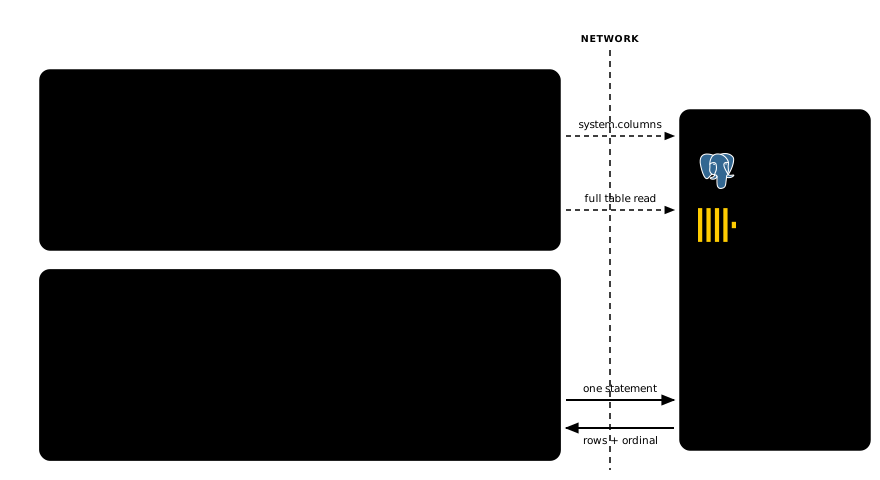
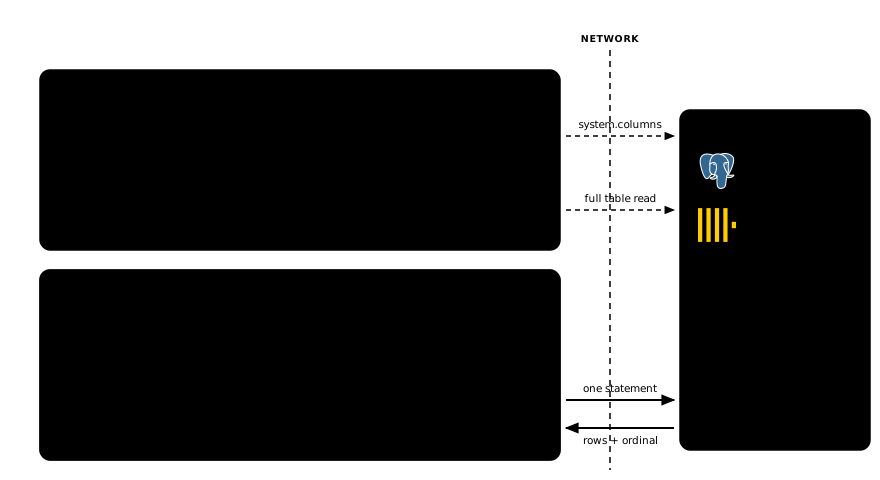
The remote engine is touched in three different ways and only one of them repeats. Reading the primary key and streaming the table happen once, when the index is created (dashed). After that the only traffic is the keyed fetch for columns that are neither indexed nor included, one statement per batch of matches.
How a row is identified differs by engine and each default follows from how
that engine works. Postgres keys on ctid, the physical row location:
universal, no primary key required and the fetch pushes down as a TID scan.
ClickHouse keys on the table's MergeTree primary key instead, read from
system.columns, because part-and-offset ids do not survive a merge. Either
default can be overridden with WITH (key_columns = ...).
The statements differ too, since each planner recognises a different shape: on Postgres the keys travel as a bound array parameter, on ClickHouse as a native columnar block sent alongside the query. Rows come back in whatever order the engine produced them and are put back in place by an ordinal that travelled out with the batch.
What else the connection is good for
A search index is one use of a foreign server. The connection underneath has a few others.
One index over several engines. An index can be built over a view and a view can be a union of tables from different servers. Fresh documents in Postgres, the archive in ClickHouse, cold data as Parquet in object storage and a single index across all of it. One query, one ranking and no stitching results back together in application code. A union has no single table to key on, so this is the keyless mode described above — postings key on a synthetic row id and you include the columns you want back.
Joins across engines. Facts in ClickHouse, dimensions in Postgres, one statement. Neither side is pre-joined or copied and the search index can sit on either of them.
ETL without the tool. Both connectors write as well as read, so
INSERT INTO ... SELECT across servers is one statement: Postgres into
ClickHouse or either of them into SereneDB's own storage once you decide the data
should be local after all. The extract can be driven by a search query, which
turns "everything matching this, into that table" into a one-liner — a document
export, a training-set build, a subset migration.
All three pull their data through one process, so the scale they suit is a nightly job, a subset or a dimension table. Hundreds of terabytes need a real pipeline.
What comes next: ODBC and ADBC
Two wrappers cover two engines. The next two cover most of the rest.
ODBC is the lowest common denominator of database connectivity. If a
database has been sold commercially in the last thirty years, it has an ODBC
driver. A wrapper shaped like clickhouse_fdw but speaking ODBC points
CREATE SERVER at anything with a DSN: MySQL, SQL Server, Oracle, Snowflake,
Redshift, Databricks, anything with a DSN.
ADBC is the newer Arrow-native one and it is the better fit for what we do. Result sets arrive as Arrow columnar batches instead of one row at a time. That matters most during an index build, where we stream a whole table exactly once. Postgres, DuckDB, Snowflake, BigQuery and Flight SQL all have ADBC drivers already.
Neither one changes anything above the connector layer. The index, the INCLUDE
columnstore, the key-based fetch and the SQL you write all stay as described
above. And for sources where no primary key can be discovered from metadata,
which becomes a good deal more likely once you are going through a generic
driver, the keyless path already exists: postings key on a synthetic row id and
the columns you included come back from the local columnstore.
You end up with one CREATE SERVER surface and one index mechanism. The list of
engines you can reach becomes the list of engines that ship a driver.
Smaller items on the connector itself: fuller batch accumulation on the lookup
path and parameterized IN {keys:Array} over the ClickHouse native protocol.
Everything here is on main, Apache 2.0.
curl https://install.serenedb.com | sh
Point a CREATE SERVER at a database you already run, build an index on a table
that isn't ours and tell us what breaks.